Seamless integration between CleverTap and the Karix RCM platform for sending RCS template messages and receiving message status handovers.
Supported Features
The CleverTap RCS Connector currently supports messaging requests only through the TEMPLATE request type. Direct request types such as Card and Carousel are not supported. However, Text, Rich Card, and Carousel templates can be successfully delivered when the request type is passed as TEMPLATE.
Any template parameters provided in the adaptor request are forwarded to the RCM platform without modification. This includes parameter formats such as 0, 1, param1, param2, and similar placeholders.
Variable Link (VL) Support
For Variable Link (VL) tracking support, the following configuration must be applied:
- The header parameter shorten_url=true must be included in the API request.
- While performing Postman validation and testing, the Variable Link parameter must be passed using the parameter name 0_sh_code.
Payload Mapping
During payload transformation, the adaptor request field msgId is mapped to the cust_ref field in the RCM-converted payload. This mapping ensures message traceability across the CleverTap and Karix platforms.
API Endpoint Configuration
Use the following endpoint for CleverTap RCS Connector integration:
https://pod1-rcmapi.instaalerts.zone/rcmreceiver/rcsapi
Handover Configuration
To enable message status and MO event handovers, the Karix Provisioning Team must configure the following template versions:
Version Name | Handover Type |
CT_101 | Delivered |
CT_102 | Viewed |
CT_990_v1 | Failed |
CT_4001 | MO Events |
Error Code Mapping
The standard RCS Error Code Mapping Sheet designated for CleverTap integrations should be used for failure event processing and troubleshooting. All error responses and failure handovers must adhere to the approved CleverTap RCS error code mapping definitions.
Additional Configuration Notes
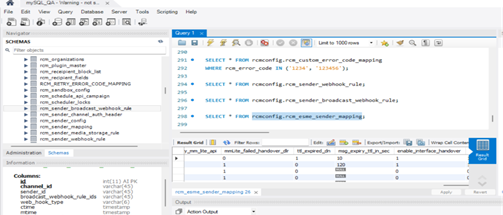
- To support interface rejection handovers, the enable_interface_handover flag must be enabled in the rcmconfig.rcm_esme_sender_mapping configuration table.
Screenshot for reference:
- Additionally, event types 090 and 100 should be blocked from handover processing. Failure event types 901, 708, 607, 990, 707, 603, 602, 702, 610, and 613 must be mapped to the CT_990_v1 handover template.
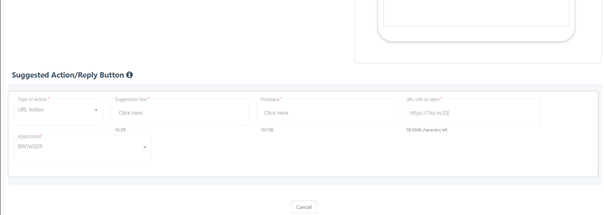
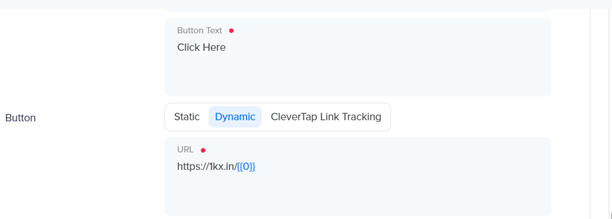
- For click tracking support, customers must use the Karix URL shortening and tracking service. Message body click events are supported through 1kx.in tracking URLs. When whitelisting templates, the base variable should be used instead of 0_sh_code, with numbering beginning from variable 0.
Screenshot for the reference: